GitHub 扫描存储库以查找已知机密格式,以防止欺诈性地使用意外提交的凭据。 Secret scanning 默认情况下,在公共存储库和公共 npm 包上发生。 存储库管理员和组织所有者还可以在专用存储库上启用 secret scanning 。 作为服务提供商,您可以与 GitHub 合作,使您的专有格式纳入我们的 secret scanning 中。
在公共源中找到密码格式的匹配项时,将向你选择的 HTTP 终结点发送有效负载。
当在已配置为 secret scanning 的私有仓库中发现与你的机密格式匹配的内容时,仓库管理员和提交者会收到警报通知,并可在 secret scanning 上查看和管理 GitHub 结果。 有关详细信息,请参阅“管理机密扫描警报”。
本文介绍如何与 GitHub 服务提供商合作并加入 secret scanning 合作伙伴计划。
secret scanning 过程
下图概述了公共存储库的 secret scanning 流程,并将任何匹配项发送到服务提供商的验证端点。 类似的过程会发送在 npm 注册表上的公共包中公开的服务提供程序令牌。

在 secret scanning 上加入 GitHub 计划
- 若要开始该过程,请与联系人 GitHub 联系。
- 识别要扫描的相关密码,并创建正则表达式来捕获它们。 有关详细信息和建议,请参阅下面的识别你的机密并创建正则表达式。
- 对于公开发现的密码匹配项,创建一个密码警报服务,以便从 GitHub 接受包含 secret scanning 消息有效负载的 Webhook。
- 在密码警报服务中实施签名验证。
- 在密码警报服务中实施密码撤销和用户通知。
- 提供误报的反馈(可选)。
若要开始该过程,请联系GitHub
要启动注册流程,请发送电子邮件至 secret-scanning@github.com。
你将收到有关 secret scanning 该计划的详细信息,你需要在继续之前同意 GitHub“参与条款”。
识别你的密码并创建正则表达式
若要扫描您的机密信息,GitHub 需要您为希望纳入 secret scanning 计划中的每项机密信息提供以下信息:
-
密码类型的唯一、人类可读的名称。 稍后我们将使用它在消息有效负载中生成
Type值。 -
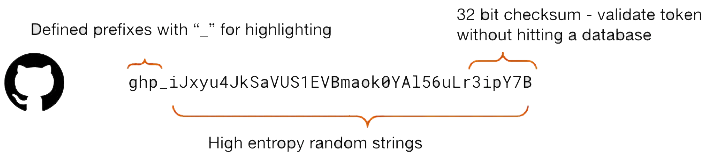
查找密码类型的正则表达式。 建议尽可能精确,因为这样有助于减少误报的数量。 有关高质量、可识别机密的一些最佳做法包括:
- 唯一定义的前缀
- 高熵随机字符串
- 32 位校验和
-
服务的测试帐户。 这将使我们能够生成和分析机密的示例,进一步减少误报。
-
从 GitHub中接收消息的终结点的 URL。 对于每个机密类型,URL 不必是唯一的。

将此信息发送至 secret-scanning@github.com。
创建密码警报服务
在你提供给我们的 URL 上创建一个可访问 Internet 的公共 HTTP 端点。 当公开找到正则表达式的匹配项时, GitHub 将向终结点发送 HTTP POST 消息。
示例请求正文
[
  {
    "token":"NMIfyYncKcRALEXAMPLE",
    "type":"mycompany_api_token",
    "url":"https://github.com/octocat/Hello-World/blob/12345600b9cbe38a219f39a9941c9319b600c002/foo/bar.txt",
    "source":"content"
  }
]
消息正文是一个 JSON 数组,其中包含一个或多个对象,每个对象表示一个机密匹配项。 你的终结点应该能够在不超时的情况下处理包含大量匹配项的请求。每个机密匹配项的密钥为:
- token: 机密匹配项的值。
- type: 你提供的用于标识正则表达式的唯一名称。
- url: 发现匹配项的公共 URL(可能为空)
- 源: 在 GitHub 上找到该令牌的位置。
source 的有效值列表如下:
- Content
- 提交
- Pull_request_title
- Pull_request_description
- Pull_request_comment
- Issue_title
- Issue_description
- Issue_comment
- Discussion_title
- Discussion_body
- Discussion_comment
- Commit_comment
- Gist_content
- Gist_comment
- 维基内容
- Wiki_commit
- Npm
- 手动提交
- 未知
在密码警报服务中实施签名验证
发送到您的服务的 HTTP 请求还将包含一些标头,我们强烈建议您使用这些标头来验证您收到的消息确实来自 GitHub,并非恶意消息。
要查找的两个 HTTP 标头为:
Github-Public-Key-Identifier:要从我们的 API 中使用哪个key_identifierGithub-Public-Key-Signature:负载的签名
您可以从GitHub获取https://api.github.com/meta/public_keys/secret_scanning密钥扫描公钥,并使用`ECDSA-NIST-P256V1-SHA256`算法验证该消息。 终结点将提供多个 key_identifier 和公钥。 可以根据 Github-Public-Key-Identifier 的值确定使用哪个公钥。
注意
向上述公钥终结点发送请求时,可能会遇到速率限制。 为了避免触及速率限制,你可以使用 personal access token (classic)(无需任何作用域)或 fine-grained personal access token(仅需对公共仓库的自动读取权限),如以下示例所示,或者使用条件请求。 有关详细信息,请参阅“使用 REST API 的最佳做法”。
注意
签名是使用原始消息正文生成的。 因此,你也必须使用原始消息正文进行签名验证,而不是解析和串联 JSON,以避免重新排列消息或更改间距,这一点很重要。
发送到验证终结点的 HTTP POST 示例
POST / HTTP/2
Host: HOST
Accept: */*
Content-Length: 104
Content-Type: application/json
Github-Public-Key-Identifier: bcb53661c06b4728e59d897fb6165d5c9cda0fd9cdf9d09ead458168deb7518c
Github-Public-Key-Signature: MEQCIQDaMKqrGnE27S0kgMrEK0eYBmyG0LeZismAEz/BgZyt7AIfXt9fErtRS4XaeSt/AO1RtBY66YcAdjxji410VQV4xg==

[{"source":"commit","token":"some_token","type":"some_type","url":"https://example.com/base-repo-url/"}]
以下代码片段演示如何执行签名验证。
代码示例假定已使用生成的 GITHUB_PRODUCTION_TOKEN 设置名为 personal access token 的环境变量以避免达到速率限制。
personal access token 不需要任何范围/权限。
Go 语言验证示例
package main

import (
  "crypto/ecdsa"
  "crypto/sha256"
  "crypto/x509"
  "encoding/asn1"
  "encoding/base64"
  "encoding/json"
  "encoding/pem"
  "errors"
  "fmt"
  "math/big"
  "net/http"
  "os"
)

func main() {
  payload := `[{"source":"commit","token":"some_token","type":"some_type","url":"https://example.com/base-repo-url/"}]`

  kID := "bcb53661c06b4728e59d897fb6165d5c9cda0fd9cdf9d09ead458168deb7518c"

  kSig := "MEQCIQDaMKqrGnE27S0kgMrEK0eYBmyG0LeZismAEz/BgZyt7AIfXt9fErtRS4XaeSt/AO1RtBY66YcAdjxji410VQV4xg=="

  // Fetch the list of GitHub Public Keys
  req, err := http.NewRequest("GET", "https://api.github.com/meta/public_keys/secret_scanning", nil)
  if err != nil {
    fmt.Printf("Error preparing request: %s\n", err)
    os.Exit(1)
  }

  if len(os.Getenv("GITHUB_PRODUCTION_TOKEN")) == 0 {
    fmt.Println("Need to define environment variable GITHUB_PRODUCTION_TOKEN")
    os.Exit(1)
  }

  req.Header.Add("Authorization", "Bearer "+os.Getenv("GITHUB_PRODUCTION_TOKEN"))

  resp, err := http.DefaultClient.Do(req)
  if err != nil {
    fmt.Printf("Error requesting GitHub signing keys: %s\n", err)
    os.Exit(2)
  }

  decoder := json.NewDecoder(resp.Body)
  var keys GitHubSigningKeys
  if err := decoder.Decode(&keys); err != nil {
    fmt.Printf("Error decoding GitHub signing key request: %s\n", err)
    os.Exit(3)
  }

  // Find the Key used to sign our webhook
  pubKey, err := func() (string, error) {
    for _, v := range keys.PublicKeys {
      if v.KeyIdentifier == kID {
        return v.Key, nil

      }
    }
    return "", errors.New("specified key was not found in GitHub key list")
  }()

  if err != nil {
    fmt.Printf("Error finding GitHub signing key: %s\n", err)
    os.Exit(4)
  }

  // Decode the Public Key
  block, _ := pem.Decode([]byte(pubKey))
  if block == nil {
    fmt.Println("Error parsing PEM block with GitHub public key")
    os.Exit(5)
  }

  // Create our ECDSA Public Key
  key, err := x509.ParsePKIXPublicKey(block.Bytes)
  if err != nil {
    fmt.Printf("Error parsing DER encoded public key: %s\n", err)
    os.Exit(6)
  }

  // Because of documentation, we know it's a *ecdsa.PublicKey
  ecdsaKey, ok := key.(*ecdsa.PublicKey)
  if !ok {
    fmt.Println("GitHub key was not ECDSA, what are they doing?!")
    os.Exit(7)
  }

  // Parse the Webhook Signature
  parsedSig := asn1Signature{}
  asnSig, err := base64.StdEncoding.DecodeString(kSig)
  if err != nil {
    fmt.Printf("unable to base64 decode signature: %s\n", err)
    os.Exit(8)
  }
  rest, err := asn1.Unmarshal(asnSig, &parsedSig)
  if err != nil || len(rest) != 0 {
    fmt.Printf("Error unmarshalling asn.1 signature: %s\n", err)
    os.Exit(9)
  }

  // Verify the SHA256 encoded payload against the signature with GitHub's Key
  digest := sha256.Sum256([]byte(payload))
  keyOk := ecdsa.Verify(ecdsaKey, digest[:], parsedSig.R, parsedSig.S)

  if keyOk {
    fmt.Println("THE PAYLOAD IS GOOD!!")
  } else {
    fmt.Println("the payload is invalid :(")
    os.Exit(10)
  }
}

type GitHubSigningKeys struct {
  PublicKeys []struct {
    KeyIdentifier string `json:"key_identifier"`
    Key           string `json:"key"`
    IsCurrent     bool   `json:"is_current"`
  } `json:"public_keys"`
}

// asn1Signature is a struct for ASN.1 serializing/parsing signatures.
type asn1Signature struct {
  R *big.Int
  S *big.Int
}
Ruby 语言验证示例
require 'openssl'
require 'net/http'
require 'uri'
require 'json'
require 'base64'

payload = <<-EOL
[{"source":"commit","token":"some_token","type":"some_type","url":"https://example.com/base-repo-url/"}]
EOL

payload = payload

signature = "MEQCIQDaMKqrGnE27S0kgMrEK0eYBmyG0LeZismAEz/BgZyt7AIfXt9fErtRS4XaeSt/AO1RtBY66YcAdjxji410VQV4xg=="

key_id = "bcb53661c06b4728e59d897fb6165d5c9cda0fd9cdf9d09ead458168deb7518c"

url = URI.parse('https://api.github.com/meta/public_keys/secret_scanning')

raise "Need to define GITHUB_PRODUCTION_TOKEN environment variable" unless ENV['GITHUB_PRODUCTION_TOKEN']
request = Net::HTTP::Get.new(url.path)
request['Authorization'] = "Bearer #{ENV['GITHUB_PRODUCTION_TOKEN']}"

http = Net::HTTP.new(url.host, url.port)
http.use_ssl = (url.scheme == "https")

response = http.request(request)

parsed_response = JSON.parse(response.body)

current_key_object = parsed_response["public_keys"].find { |key| key["key_identifier"] == key_id }

current_key = current_key_object["key"]

openssl_key = OpenSSL::PKey::EC.new(current_key)

puts openssl_key.verify(OpenSSL::Digest::SHA256.new, Base64.decode64(signature), payload.chomp)
JavaScript 语言验证示例
const crypto = require("crypto");
const axios = require("axios");

const GITHUB_KEYS_URI = "https://api.github.com/meta/public_keys/secret_scanning";

/**
 * Verify a payload and signature against a public key
 * @param {String} payload the value to verify
 * @param {String} signature the expected value
 * @param {String} keyID the id of the key used to generated the signature
 * @return {void} throws if the signature is invalid
 */
const verify_signature = async (payload, signature, keyID) => {
  if (typeof payload !== "string" || payload.length === 0) {
    throw new Error("Invalid payload");
  }
  if (typeof signature !== "string" || signature.length === 0) {
    throw new Error("Invalid signature");
  }
  if (typeof keyID !== "string" || keyID.length === 0) {
    throw new Error("Invalid keyID");
  }

  const keys = (await axios.get(GITHUB_KEYS_URI)).data;
  if (!(keys?.public_keys instanceof Array) || keys.length === 0) {
    throw new Error("No public keys found");
  }

  const publicKey = keys.public_keys.find((k) => k.key_identifier === keyID) ?? null;
  if (publicKey === null) {
    throw new Error("No public key found matching key identifier");
  }

  const verify = crypto.createVerify("SHA256").update(payload);
  if (!verify.verify(publicKey.key, Buffer.from(signature, "base64"), "base64")) {
    throw new Error("Signature does not match payload");
  }
};
在密码警报服务中实施密码撤销和用户通知
对于被公开发现的 secret scanning,您可以增强机密警报服务,以撤销已暴露的机密并通知受影响的用户。 如何在你的机密警报服务中实现这一点取决于你,但我们建议将任何 GitHub 向你发送相关消息的机密都视为已公开且已泄露。
提供误报的反馈
我们在合作伙伴响应中收集有关检测到的各个密码有效性的反馈。 如果希望参与,请发送电子邮件至 secret-scanning@github.com。
向你报告密码时,我们会发送一个 JSON 数组,其中有包含令牌、类型标识符和提交 URL 的每个元素。 当你向我们发送反馈时,你将向我们发送有关检测到的令牌是真凭据还是假凭据的信息。 我们接受以下格式的反馈。
你可以向我们发送原始令牌:
[
  {
    "token_raw": "The raw token",
    "token_type": "ACompany_API_token",
    "label": "true_positive"
  }
]
你还可以使用 SHA-256 对原始令牌执行单向加密哈希后,以哈希形式提供令牌:
[
  {
    "token_hash": "The SHA-256 hashed form of the raw token",
    "token_type": "ACompany_API_token",
    "label": "false_positive"
  }
]
重要事项:
- 你应该只向我们发送令牌的原始形式 ("token_raw") 或哈希形式,而不要同时发送这两种形式。
- 对于原始令牌的哈希形式,你只能使用 SHA-256 对令牌进行哈希处理,而不能使用任何其他哈希算法。
- 用标签指示令牌为实报 ("true_positive") 还是误报 ("false_positive")。 只允许使用这两个小写的文字字符串。
注意
对于提供误报数据的合作伙伴,我们的请求超时设置为更长时间(即 30 秒)。 如果需要超过 30 秒的超时时间,请发送电子邮件至 secret-scanning@github.com。