Introduction
You can configure Copilot code review to review pull requests automatically. For an overview of automatic pull request reviews, see Informationen zur GitHub Copilot Code-Review.
Configuring automatic code review for your own pull requests
Hinweis
This is only available if you are on the Copilot Pro, Copilot Pro+, or Copilot Max plans.
-
Klicke in der oberen rechten Ecke einer beliebigen Seite auf dein Profilbild und dann auf Copilot settings.
-
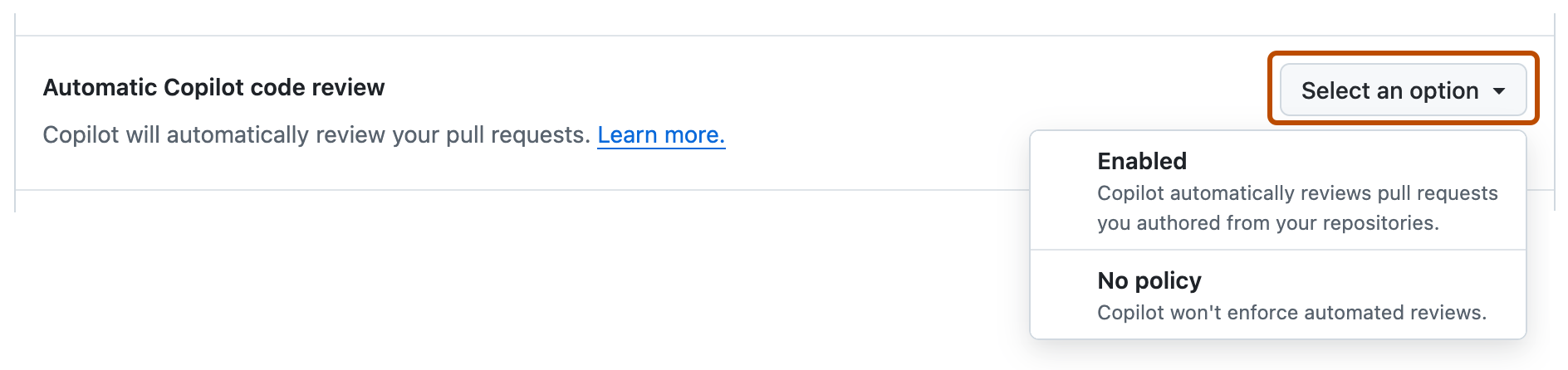
Locate the Automatic Copilot code review option and click the dropdown button.
-
In the dropdown menu, select Enabled.

Configuring automatic code review for a repository
You can enable automatic code reviews for a repository and customize how code reviews are performed.
Enabling automatic reviews
-
Navigieren Sie auf GitHub zur Hauptseite des Repositorys.
-
Klicke unter dem Repositorynamen auf Settings. Wenn die Registerkarte „Einstellungen“ nicht angezeigt wird, wähle im Dropdownmenü die Option Einstellungen aus.

-
Klicke auf der linken Randleiste unter „Code und Automatisierung“ auf Regeln und dann auf Regelsätze.

-
Klicken Sie auf Neuer Regelsatz.
-
Klicken Sie auf Neuer Branch-Regelsatz.
-
Geben Sie unter „Regelsatzname“ einen Namen für den Regelsatz ein.
-
Um den Regelsatz zu aktivieren, wählst du unter „Enforcement Status“ Active aus.
-
Under "Target branches," click Add target and choose one of the options—for example, Include default branch or Include all branches.
-
Klicke unter „Target branches“ auf Add target, und wähle eine der Zieloptionen aus.
-
Wähle unter „Branch rules“ die Option Automatically request Copilot code review aus.
Dadurch werden verschiedene untergeordnete Optionen erweitert.

-
Wenn Copilot alle neuen Pushss an den Pull Request überprüfen soll, wähle optional Review new pushes aus.
Wenn diese Option nicht ausgewählt ist, überprüft Copilot den Pull Request lediglich einmal.
-
Wenn Copilot Pull Requests im Entwurfsstatus überprüfen soll, wähle optional Review draft pull requests aus.
Das kann eine nützliche Option sein, um Fehler frühzeitig zu erkennen, bevor eine Überprüfung durch einen Benutzer angefordert wird.
-
Klicke unten auf der Seite auf Create.


Customizing Copilot code review
You can configure how Copilot code review completes code reviews in your repository.
-
Navigieren Sie auf GitHub zur Hauptseite des Repositorys.
-
Klicke unter dem Repositorynamen auf Settings. Wenn die Registerkarte „Einstellungen“ nicht angezeigt wird, wähle im Dropdownmenü die Option Einstellungen aus.
-
In der Randleiste unter "Code, Planung und Automatisierung" click Copilot, then Code review.
-
To choose the depth of Copilot code reviews, next to "Review effort level," select the effort level for automatic reviews in this repository.
- Lite: Standard review.
- Balanced: Deeper analysis of complex logic, security-sensitive code, and cross-service changes.
Balanced reviews use more AI credits, and may consume marginally more GitHub Actions minutes. See Informationen zur GitHub Copilot Code-Review.
-
To choose whether Copilot can approve pull requests in your repository, configure the settings under "Auto-approval."
-
Allow Copilot to approve pull requests: Toggle on to let Copilot submit approving reviews.
-
Allow Copilot approvals to count toward merge requirements: Toggle on so Copilot approvals can satisfy pull request approval requirements.
-
File paths: Optionally, limit which pull requests count toward merge requirements. Enter one file glob per line to count approvals only on pull requests where every changed file matches one of the globs. Leave blank to count approvals for all files. Up to 15 globs are supported.
Hinweis
Copilot approvals are in Öffentliche Vorschau and subject to change.
-
Configuring automatic code review for repositories in an organization
You can enable automatic code reviews for repositories in your organization and customize how code reviews are performed.
Enabling automatic reviews
-
Klicke in der rechten oberen Ecke von GitHub auf dein Profilbild und dann auf Your organizations.
-
Wählen Sie eine Organisation aus, indem Sie darauf klicken.
-
Klicke unter dem Organisationsnamen auf Settings. Wenn die Registerkarte „Einstellungen“ nicht angezeigt wird, wähle im Dropdownmenü die Option Einstellungen aus.

-
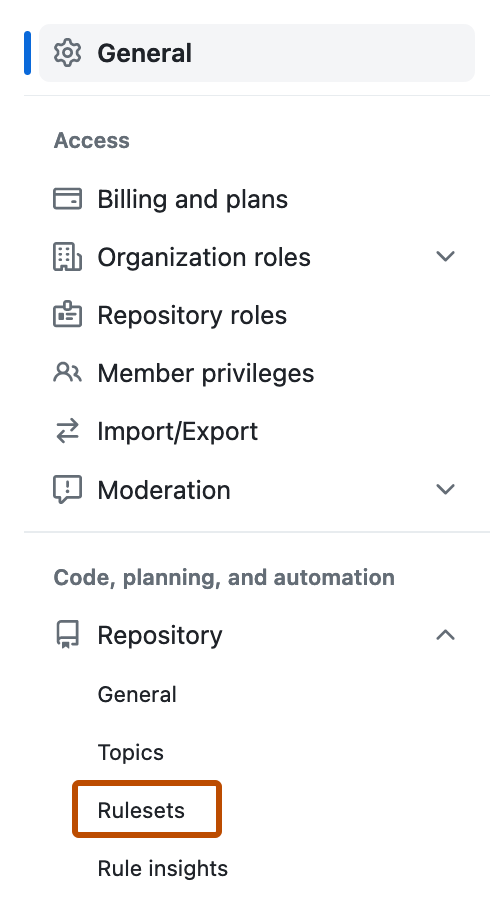
In der Randleiste unter "Code, Planung und Automatisierung" klicken Sie auf "Repository", und klicken Sie dann auf "Rulesets".
-
Klicken Sie auf Neuer Regelsatz.
-
Klicken Sie auf Neuer Branch-Regelsatz.
-
Geben Sie unter „Regelsatzname“ einen Namen für den Regelsatz ein.
-
Um den Regelsatz zu aktivieren, wählst du unter „Enforcement Status“ Active aus.
-
Under "Target repositories," click Add target and choose either Include by pattern or Exclude by pattern.
-
Type a pattern that matches the repository names you want to target—for example,
*featureto match all repositories with names ending infeature.For pattern-matching syntax, see Erstellen von Regelsätzen für Repositorys in deiner Organisation.
-
Click Add inclusion pattern or Add exclusion pattern.
-
Repeat for any additional patterns.
Hinweis
You can add multiple targeting criteria to the same ruleset. Exclusion patterns are applied after inclusion patterns. For example, you could include any repositories matching the pattern
*cat*, and specifically exclude a repository matching the patternnot-a-cat. -
Klicke unter „Target branches“ auf Add target, und wähle eine der Zieloptionen aus.
-
Wähle unter „Branch rules“ die Option Automatically request Copilot code review aus.
Dadurch werden verschiedene untergeordnete Optionen erweitert.
-
Wenn Copilot alle neuen Pushss an den Pull Request überprüfen soll, wähle optional Review new pushes aus.
Wenn diese Option nicht ausgewählt ist, überprüft Copilot den Pull Request lediglich einmal.
-
Wenn Copilot Pull Requests im Entwurfsstatus überprüfen soll, wähle optional Review draft pull requests aus.
Das kann eine nützliche Option sein, um Fehler frühzeitig zu erkennen, bevor eine Überprüfung durch einen Benutzer angefordert wird.
-
Klicke unten auf der Seite auf Create.


Customizing Copilot code review
You can configure how Copilot code review completes code reviews in repositories in your organization.
-
Klicke in der rechten oberen Ecke von GitHub auf dein Profilbild und dann auf Your organizations.
-
Wählen Sie eine Organisation aus, indem Sie darauf klicken.
-
Klicke unter dem Organisationsnamen auf Settings. Wenn die Registerkarte „Einstellungen“ nicht angezeigt wird, wähle im Dropdownmenü die Option Einstellungen aus.
-
In der Randleiste unter "Code, Planung und Automatisierung" click Copilot, then Code review.
-
To choose the depth of Copilot code reviews, next to "Review effort level," select the default effort level for automatic reviews in repositories in your organization.
- Lite: Standard review.
- Balanced: Deeper analysis of complex logic, security-sensitive code, and cross-service changes.
Balanced reviews use more AI credits, and may consume marginally more GitHub Actions minutes. See Informationen zur GitHub Copilot Code-Review.
-
To choose whether Copilot can approve pull requests in your repositories, select an option under "Approvals," next to "Count Copilot approvals toward merge requirements."
-
Enabled everywhere: Copilot approvals can count toward merge requirements in every repository in the organization.
-
Let repositories decide: Repository admins can decide this in repository settings.
-
Enable for selected repositories: Copilot approvals can count toward merge requirements only in the repositories you select. If you choose this option, also assign the repositories you want to enable this for.
-
Disabled everywhere: Copilot approvals cannot count toward merge requirements in any repository in the organization.
Hinweis
Copilot approvals are in Öffentliche Vorschau and subject to change.
-
Configuring automatic code review for an enterprise
You can enable automatic code reviews for your enterprise and customize how code reviews are performed.
Enabling automatic reviews
- Create an enterprise-level branch ruleset. See Durchsetzung der Code-Governance in Ihrem Unternehmen mithilfe von Regelsätzen.
- Target the organizations and repositories where Copilot code review should run automatically.
- Enable the Automatically request Copilot code review policy.
- Optionally, enable automatic reviews for draft pull requests and after each push to a pull request.
- Click Create.
Customizing Copilot code review
You can configure how Copilot code review completes code reviews for your enterprise.
- Navigieren Sie zu Ihrem Unternehmen. Beispielsweise auf der Seite Unternehmen in GitHub.com.
- Klicken Sie oben auf der Seite auf AI-Steuerelemente.
- Scroll down to "Available Agents", then click Copilot code review.
- Next to "Copilot code review", select a policy.
- Then choose which Copilot code review features to enable for your enterprise.
- To choose whether Copilot can approve pull requests in your organizations, next to "Allow Copilot to approve pull requests," select a policy.
-
Let organizations decide: Organization owners can choose whether to enable Copilot approvals.
-
Enable for selected organizations: Copilot approvals are enabled only for the organizations you select.
-
Disabled everywhere: Organizations cannot enable Copilot approvals. This is the default.
Hinweis
Copilot approvals are in Öffentliche Vorschau and subject to change.
-